はじめに
今は、プログラミングで生成 AI を使う人がほとんどじゃないかなって思う。
codex や claude codeなどのエージェントをガンガン使いたいところだが、ちょっと使えば、利用上限が来てしまう。
そこで、利用上限が来たら、ChatGPTのチャットにソースコードを zip にして、それを投げて質問したり、修正してもらったりしている。
しかし、Gradle プロジェクトをそのままチャットに投げると、外部ネットワークにアクセスできず、依存ライブラリを取得できない。その結果、ChatGPT上でgradlew testが実行できない。
今回は、ChatGPT に Gradle プロジェクトを渡しても gradlew test できるようにする方法を、備忘録として残しておく。
Gradle プロジェクトをそのまま投げたとき
Gradle プロジェクトを ZIP にしたものをチャットに投げると、次のようなことを言われ、Gradle タスクを実行できない旨を言われると思う。
Gradle Wrapper が Gradle 本体を取得しようとして、ネットワーク名前解決で失敗しています。
……
これの解決方法は後で書くが、これを突破したとしても、次はこのようなことを言われる。
外部 Maven に到達できないため依存解決で止まりました。
……
つまり、次の2つを解決する必要がある。
- Gradle 本体を取得できない
- 外部ライブラリを取得できない
解決方法
Gradle 本体を同梱する
ターミナルから次のコマンドを実行し、プロジェクト内にGradle 本体を同梱させる。
bashの場合:
cd <Gradle プロジェクト>
export GRADLE_USER_HOME="$PWD/.gradle-chatgpt"
./gradlew --version
./gradlew test
PowerShellの場合:
cd <Gradle プロジェクト>
$env:GRADLE_USER_HOME = "$PWD\.gradle-chatgpt"
.\gradlew.bat --version
.\gradlew.bat test
これで、プロジェクトルート直下に .gradle-chatgpt というディレクトリができたことを確認する。
ChatGPTには、次のように依頼するようにする。
GRADLE_USER_HOME="$PWD/.gradle-chatgpt"
を設定して、gradlew test を実行してください。
ChatGPTでプロジェクトを使っている場合は、情報源にマークダウンでもおいて、上の依頼を入れておいたら便利だと思う。
これで、Gradle 本体がとれない問題は解決する。
外部ライブラリを同梱する
Gradle ではホームディレクトリの下にある.gradle/caches/modules-2/files-2.1の下に外部ライブラリの jar や pom がある。(もしかしたら、環境によっては微妙にパスが違うかもしれない)
この中の使っているライブラリを Gradle プロジェクトのルート直下にlocal-repositoryに以下のような形で jar と pom を置く。
例: junit-jupiter 6.0.0の場合
<Gradleプロジェクトのルートディレクトリ>/local-repository/org/junit/jupiter/junit-jupiter/6.0.0/junit-jupiter-6.0.0.jar
<Gradleプロジェクトのルートディレクトリ>/local-repository/org/junit/jupiter/junit-jupiter/6.0.0/junit-jupiter-6.0.0.pom
ただ、こんなことを手動でやっていたら、日が暮れてしまう。
自分は次のようなGradle タスクcopyExternalDepsToLocalRepositoryを使っている。(チャッピー製)
build.gradleに以下を追記する。
tasks.register('copyExternalDepsToLocalRepository') {
	group = 'chatgpt'

	doLast {
		def repoDir = rootProject.layout.projectDirectory.dir('local-repository').asFile

		def configurationNames = [
			'compileClasspath',
			'runtimeClasspath',
			'testCompileClasspath',
			'testRuntimeClasspath',
			'annotationProcessor',
			'testAnnotationProcessor'
		]

		def moduleIds = [] as Set<ModuleComponentIdentifier>
		def copiedFiles = [] as Set<String>

		allprojects.each { p ->
			configurationNames.each { configurationName ->
				def config = p.configurations.findByName(configurationName)

				if (config == null || !config.canBeResolved) {
					return
				}

				println "resolving ${p.path}:${configurationName}"

				config.incoming.resolutionResult.allComponents.each { component ->
					if (component.id instanceof ModuleComponentIdentifier) {
						moduleIds.add(component.id)
					}
				}

				def artifacts = config.incoming.artifactView {
					componentFilter { componentId ->
						componentId instanceof ModuleComponentIdentifier
					}
				}.artifacts.artifacts

				artifacts.each { ResolvedArtifactResult artifact ->
					def id = artifact.id.componentIdentifier

					if (!(id instanceof ModuleComponentIdentifier)) {
						return
					}

					def groupPath = id.group.replace('.', '/')
					def targetDir = new File(repoDir, "${groupPath}/${id.module}/${id.version}")
					targetDir.mkdirs()

					def targetFile = new File(targetDir, artifact.file.name)
					if (!copiedFiles.add(targetFile.absolutePath)) {
						return
					}

					copy {
						from artifact.file
						into targetDir
					}

					println "copied artifact ${id.group}:${id.module}:${id.version} -> ${artifact.file.name}"
				}
			}
		}

		def pomResult = dependencies.createArtifactResolutionQuery()
				.forComponents(moduleIds)
				.withArtifacts(MavenModule, MavenPomArtifact)
				.execute()

		def copiedPoms = [] as Set<String>

		pomResult.resolvedComponents.each { component ->
			if (!(component.id instanceof ModuleComponentIdentifier)) {
				return
			}

			def id = component.id
			def key = "${id.group}:${id.module}:${id.version}"
			def groupPath = id.group.replace('.', '/')
			def targetDir = new File(repoDir, "${groupPath}/${id.module}/${id.version}")
			targetDir.mkdirs()

			component.getArtifacts(MavenPomArtifact).each { artifactResult ->
				if (artifactResult instanceof ResolvedArtifactResult) {
					copy {
						from artifactResult.file
						into targetDir
						rename { "${id.module}-${id.version}.pom" }
					}

					copiedPoms.add(key)
					println "copied pom ${key}"
				} else if (artifactResult instanceof UnresolvedArtifactResult) {
					println "failed pom ${key} - ${artifactResult.failure.message}"
				}
			}
		}

		moduleIds.each { id ->
			def key = "${id.group}:${id.module}:${id.version}"
			if (copiedPoms.contains(key)) {
				return
			}

			def groupPath = id.group.replace('.', '/')
			def targetDir = new File(repoDir, "${groupPath}/${id.module}/${id.version}")
			targetDir.mkdirs()

			def fallbackPom = new File(targetDir, "${id.module}-${id.version}.pom")

			if (!fallbackPom.exists()) {
				fallbackPom.text = """<?xml version="1.0" encoding="UTF-8"?>
<project xmlns="http://maven.apache.org/POM/4.0.0"
         xmlns:xsi="http://www.w3.org/2001/XMLSchema-instance"
         xsi:schemaLocation="http://maven.apache.org/POM/4.0.0 https://maven.apache.org/xsd/maven-4.0.0.xsd">
    <modelVersion>4.0.0</modelVersion>
    <groupId>${id.group}</groupId>
    <artifactId>${id.module}</artifactId>
    <version>${id.version}</version>
</project>
"""
				println "created fallback pom ${key}"
			}
		}
	}
}
IntelliJのGradleの依存関係の欄を見て、configurationNamesにないものがあれば、追加するようにする。
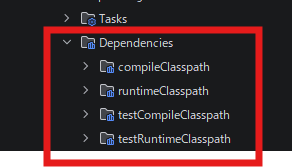
def configurationNames = [
	'compileClasspath',
	'runtimeClasspath',
	'testCompileClasspath',
	'testRuntimeClasspath',
	'annotationProcessor',
	'testAnnotationProcessor' // 足りないものを追加する
]
これで、jar や pom をGradle プロジェクトに含めることができたが、Gradleにlocal-repositoryを使ってもらうようにしないといけない。
local-repositoryからも外部ライブラリを使えるように、build.gradleのrepositoriesに次を追加する。
repositories {
	maven {
		url = uri("$rootDir/local-repository")
	}
}
これで、ChatGPT上でgradlew testを実行してもらえるようになる。
ディレクトリ構成
ChatGPTに ZIP を投げる際にはlocal-repositoryと.gradle-chatgptを含めるようにする。buildや.gradleは含めないでいい。
ChatGPT に渡す時の ZIP 構成は、例えば、次のようになる。
sample-project/
├── .gradle-chatgpt/
│   └── wrapper/
│       └── dists/
├── gradle/
│   └── wrapper/
│       ├── gradle-wrapper.jar
│       └── gradle-wrapper.properties
├── local-repository/
│   └── ...
├── src/
├── build.gradle
├── settings.gradle
├── gradlew
└── gradlew.bat
ChatGPTに ZIP でソースコードを返してもらう際には、容量が大きすぎると、ダウンロードできないことがある。
ChatGPT にプロジェクトを渡すときは、local-repository と .gradle-chatgpt を ZIP に含めるが、修正版のソースコードを ZIP で返してもらうときは、容量削減のために、local-repository と .gradle-chatgpt は含めないように依頼する。
修正版の ZIP を作成する場合は、容量削減のため、`local-repository` と `.gradle-chatgpt` フォルダは含めないでください。
などと言っておいた方がいいだろう。
ChatGPT への依頼文例
○○機能を追加してください。

ソースコード修正後、この Gradle プロジェクトをテストしてください。

Gradle は `.gradle-chatgpt` を `GRADLE_USER_HOME` に設定して実行してください。
依存ライブラリは `local-repository` に入れています。

`gradlew test` を実行してください。

失敗した場合は、原因と修正案を教えてください。
ソースを修正する前に、修正内容をまとめてください。

修正したソースコードの ZIP を作成する場合は、容量削減のため、`local-repository` と `.gradle-chatgpt` フォルダは含めないでください。